

Integrations
Bring Arcweave content into your game engine with our free official plugins, or read and write project content from your own tools and AI assistants with our REST API and MCP server.

- Free and open-source
- Real-time sync
- API support
- Localization support
- Built-in visual flowchart

- Free and open-source
- Real-time sync
- API support
- Localization support
- Blueprint ready

- Free and open-source
- Real-time sync
- API support
- Localization support
- C# and GDScript support
Want more? Explore our third party plugins
Real-time sync
Experience the power of real-time updates. As you make changes in Arcweave, see them instantly reflected in your game.
Build on your Arcweave projects
Use a workspace API key to connect your own tools or your AI assistant. Both read and write live project content.
REST API
Automate content updates and build custom pipelines from your own tools.
POST /api/v1/{project}/element
Authorization: Bearer ••••

{
  "boardId": "b1",
  "x": 200,
  "y": 300,
  "title": "<p>The Gate</p>"
}
- Read boards, elements, and variables
- Create and update content
- Engine-ready exports
MCP server
Let your AI assistant explore your story, edit content, and export for your game engine.
Find dead ends in the Act 1 board and add a note on each
↳ arcweave_list_elements · arcweave_create_note ×3
Found 3 elements with no outgoing choices. I added a note next to each one.
Works with Claude, Claude Code, Codex, Cursor, VS Code, Gemini CLI and more
Set up the MCP serverSample projects
See Arcweave integrations in action with our sample projects

Unreal example
Open the Unreal sample project to see Arcweave graphs imported, synced, and used in-game to drive branching dialogue and logic.
Explore example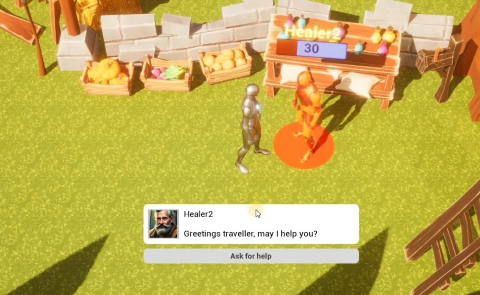
Unity example
Explore the Unity sample to learn the full workflow: import in the Editor, load at runtime, and consume Arcweave content from C#.
Explore example
Godot example
Try a small RPG-style demo that shows importing an Arcweave project in Godot and running branching conversations and choices.
Explore example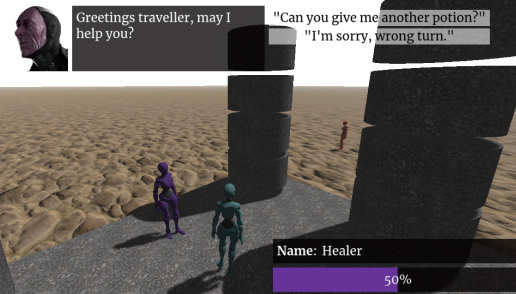
Video tutorials
A step-by-step guide to setting up our plugins in your game engine of choice.

Third party plugins
Looking for something else?
Check some unofficial Arcweave plugins and integrations

Dialogue System for Unity
Dialogue System for Unity, created by Pixel Crushers, makes it easy to add interactive dialogue and quests to your game. It includes a visual node editor, dialogue UIs, cutscenes, quest logs, save/load, and an importer for Arcweave. It is fully documented and thoroughly optimised for C# source code.

Hology
Transform Arcweave projects into immersive 3D experiences on web, mobile, and desktop with an intuitive editor and gameplay functionality (character controllers and physics). The integration comes with documentation and an example game project.
GDArcweave
GDArcweave is a community Godot plugin for connecting Arcweave projects to Godot workflows.

arcweave-rust
arcweave-rust is a community Rust runtime for integrating Arcweave project data into custom Rust tools, services, and game pipelines.